
Every wedding or party has this same old problem. Hundred guests takes photos on their own phone, and half of those pictures never reaches the couple or the host later. Picsdrop solves this exact headache with its photo drop feature, where guest can upload picture directly into shared gallery without downloading any app.
The whole idea behind photo drop on Picsdrop is removing friction. Guest just scans QR code, browser opens itself, and photo gets uploaded in few seconds only.

What Is Photo Drop On Picsdrop
Photo drop, in simple words, means guest drops their photo straight into event gallery instead of sending it through WhatsApp or email one by one. On Picsdrop, host creates the event page beforehand and gets a unique QR code generated for it.
Guest scans that code using phone camera, and gallery opens on browser itself. No login, no account creation, no app installation required. Even relatives who are not much technical can use it without any confusion.
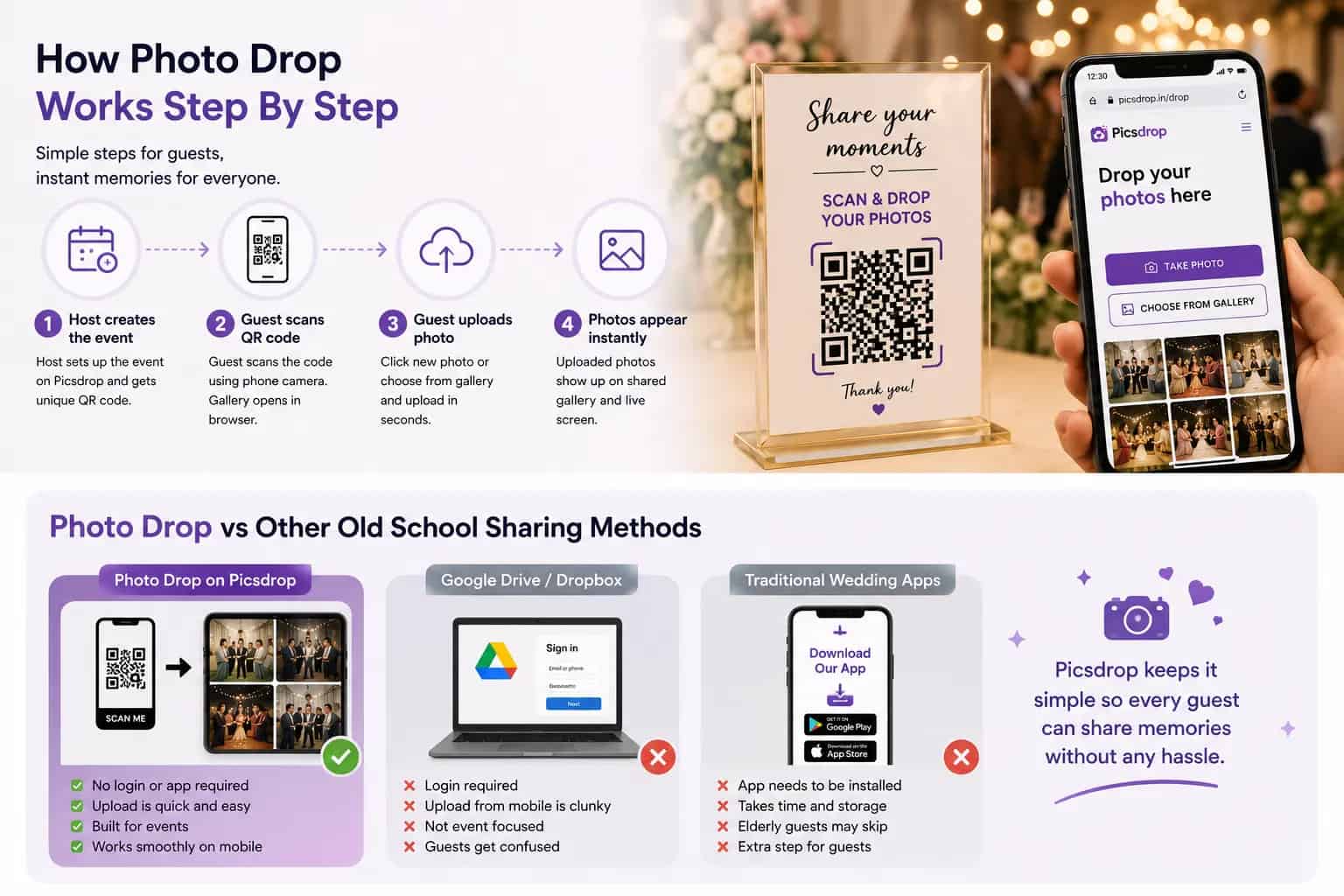
How Photo Drop Works Step By Step
Setting up photo drop on Picsdrop does not take much time.
Host first creates the event on Picsdrop platform and customize gallery name, theme and date. Once done, a QR code gets generated automatically, which host can print on invitation card or table stand.
During the function, guest simply scans the code and the upload page opens on their phone browser. Photo drop happens instantly, either by clicking new picture through in browser camera or selecting old ones from gallery roll. Uploaded photos shows up on shared screen almost immediately, which honestly keeps guest excited and involved throughout the event.
Why Picsdrop's Photo Drop Feature Is Useful For Guests And Hosts Both
Traditional method like shared drive folder or asking guest to email pictures puts extra work on host later. Sorting through hundreds of images manually is not much fun after a tiring wedding.
With Picsdrop, photo drop organizes everything on its own as pictures comes in. Host does not need to chase anyone for their camera roll after event gets over. Photographers also benefit from this, since guest often captures candid moment that professional camera missed completely, like backstage laughing or late night dance floor moves.
Cost wise also, using Picsdrop's photo drop link works out cheaper than hiring separate photo booth setup for guest engagement.
Tips To Get Best Out Of Photo Drop Feature
Print QR code big enough on table cards so guest spot it without straining eyes. Placing it near entrance also helps a lot.
Add one line instruction below code like "scan and drop your photo here", first time users understands quicker this way. Announcing it once during speeches also reminds guest who forgets otherwise.
Keep the Picsdrop gallery link active few days after event finishes, since some guest uploads late once they reach home and scroll through their phone properly.
Photo Drop vs Other Old School Sharing Methods
Compared to Google Drive or Dropbox folder, photo drop on Picsdrop feels built specifically for events. Drive links requires login most of the time and upload experience on mobile browser is clunky, guest gets confused easily.
Compared to dedicated wedding apps that requires download, Picsdrop skips that step entirely. This matters a lot when guest list has many elderly relatives who does not want to install new app just for one function.
FAQ
Is photo drop free on Picsdrop for small events?
Picsdrop generally offers photo drop feature free for smaller guest count, with premium plans available for extra storage or themes. Good idea to check plan details before booking for bigger events.
Do guests need internet to use photo drop feature?
Yes, guest needs mobile data or venue wifi connection to scan and upload picture. If venue network is weak, arranging small wifi hotspot near entrance helps upload go smoothly.
Can Picsdrop gallery be made private with password?
Yes, host can set password or keep gallery link private, so only guest with QR code can view or upload photo. This keeps random strangers away from personal event pictures.
How long does Picsdrop keep photo drop gallery active?
Depends on plan chosen, free gallery usually stays live for limited days while paid plan keeps it longer. Downloading all photos in zip file soon after event is recommended anyway.
Does Picsdrop's photo drop work for events other than wedding?
Absolutely, birthday party, corporate event, reunion or school function, photo drop feature works fine anywhere there is group of people with phone in hand.
What if a guest uploads something inappropriate through photo drop?
Picsdrop gives host moderation control, meaning any uploaded photo can be approved or removed before it shows up on public gallery or live slideshow.
Conclusion
Collecting photos from big function used to mean weeks of chasing guest for their camera roll. Picsdrop's photo drop feature changes that by putting upload directly in guest's hand, right there at venue itself. It saves host from extra work later and gives guest something fun to do between event. If next function has decent guest count, setting up photo drop gallery on Picsdrop is probably easiest upgrade for collecting memories this time.