




Nov 17, 2026
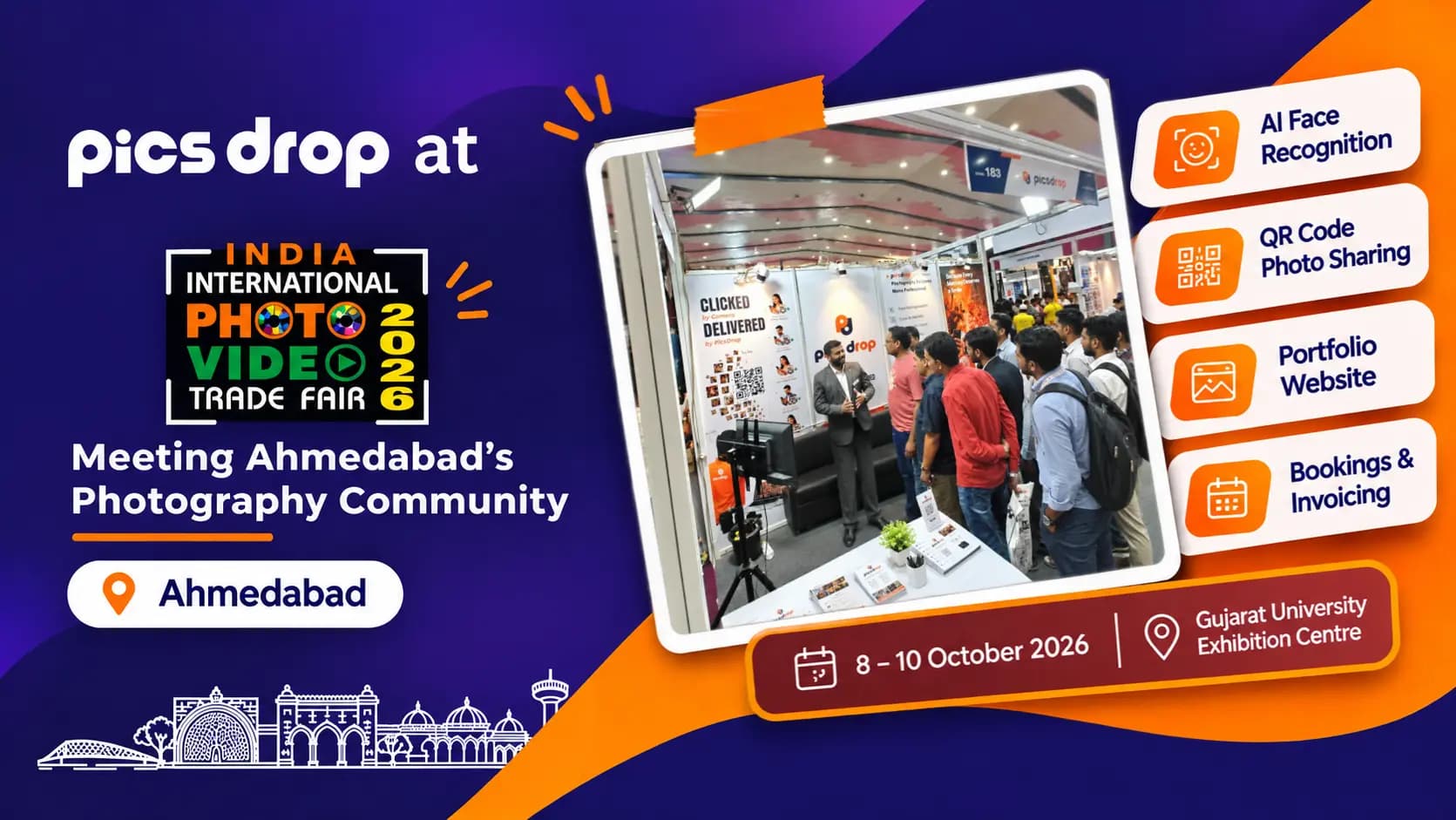
PicsDrop at IIPVTF 2026: Meeting Ahmedabad's Photography Community
PicsDrop at IIPVTF 2026 in Ahmedabad, 8-10 October, organised by Aakar Exhibition Pvt. Ltd. See what we showed and what we learned.
Small fixes should not need another app. The PicsDrop image editor lets you crop, straighten and adjust photos directly from your event, then save them back to the gallery, so you never export, re-upload and replace a file by hand.

Small fixes should not need another app. The PicsDrop image editor lets you crop, straighten and adjust photos directly from your event, then save them back to the gallery, so you never export, re-upload and replace a file by hand.
Open any photo, drag the crop to fix the framing, rotate a tilted horizon and nudge brightness, contrast and warmth until the photo looks right. Everything runs in the browser, so it works the same on your studio laptop, a tablet at the venue or any computer you borrow.
Combine editing with your watermark and original or compressed delivery options to hand clients polished photos without extra software. For full retouching keep using Lightroom or Photoshop. PicsDrop covers the quick fixes that otherwise cost you a round trip.
Related: Photo selection · Event management
Pick a photo in your event and open it in the editor.
Crop, rotate and fine-tune the photo directly in the browser.

Save the edit back to the gallery and deliver with your watermark settings.
Quick fixes happen where your photos already live.
Edit from a laptop or tablet with just a browser.
Protect previews and keep originals safe.
Fix and ship in one place instead of exporting again.
No export, re-upload or replacing files by hand. Save and the gallery is updated.
Straighten a horizon, tighten a crop or lift a dark photo before guests see it.
Fix a crop or tilt before guests see the photo.
Skip another subscription for quick edits.
Make small fixes between shoots.
Let an editor tidy up photos as they arrive, without sharing source files.
Turn around a same-day gallery without a round trip through desktop software.
Nothing to install, so edits work from any laptop with a browser.
No. The editor runs in your browser from the event page.
Yes. You can set a watermark for previews and choose whether guests download original or compressed quality.
You can crop, rotate and straighten a photo and adjust basics such as brightness, contrast and warmth.
Once you save, the edited photo replaces the version in the event gallery, so guests and clients see the fixed version when they open the link.
Yes. The editor runs in the browser, so any device with a modern browser can open it. A larger screen is easier for precise cropping.
No. It is meant for quick fixes like crop, rotate and basic adjustments. Use your editing software for full retouching.
You choose what to save. Check your original and compressed delivery options in your event settings.
Easily set up your event photo gallery on PicsDrop in seconds. Streamline your event photography workflow with our rapid creation tools. Try PicsDrop free!
Generate & send professional photography invoices in a few clicks. Track client payments and manage deposits easily with PicsDrop's invoice builder tool.
Build a photography portfolio website in minutes with integrated lead capture. Choose templates, connect custom domains, and manage leads easily.
Generate custom event QR codes for instant photo sharing. Guests scan the QR code, take a selfie, and find all their photos in seconds with AI face search.
Manage client bookings and scheduling with ease. Log client details, track advance payments, and view your schedule date-wise from a clean dashboard.
AI face recognition photo sharing uses smart matching to deliver guest photos instantly. Guests upload a selfie to retrieve their pictures in seconds.
Build stunning wedding websites in seconds. Features interactive wedding itineraries, RSVP forms, countdown timers, photo & video galleries, and maps.
Transfer photos directly from your camera to your PicsDrop event gallery via FTP. Every shot goes live instantly — no manual uploads, no USB cables, no delays.
Share a selection link, let clients mark their favourite photos for the album, and get the final list without spreadsheets or long chat threads.
PicsDrop at IIPVTF 2026 in Ahmedabad, 8-10 October, organised by Aakar Exhibition Pvt. Ltd. See what we showed and what we learned.

PicsDrop joined photographers, creators, and industry professionals to showcase its platform, exchange ideas, and explore photography innovations.

Wondering how long wedding photo delivery should take? Here is what a normal wedding photography turnaround time looks like and how to speed it up.